
Plans
A plan is an ordered list of steps the builder agent intends to follow when executing a work item. No execution begins until a plan is approved. Each approval decision is recorded in the item's activity timeline.
Plan versions
A work item can have more than one plan. When a plan is rejected, the builder agent writes a new one; the previous version stays in the item's history with a status of rejected. Each plan version carries its own status: submitted, approved, or rejected.
Submitting a plan
The builder agent drafts and submits a plan automatically after triage. Once submitted, the work item moves to awaiting approval and a pending action appears on your board.
If you create a plan manually using the fallback form on the work item's Plan tab, submit it the same way to queue it for approval.
Approve or reject
Open the work item. The Plan node on the Overview tab shows the plan steps and a decision box below them once a plan is submitted.
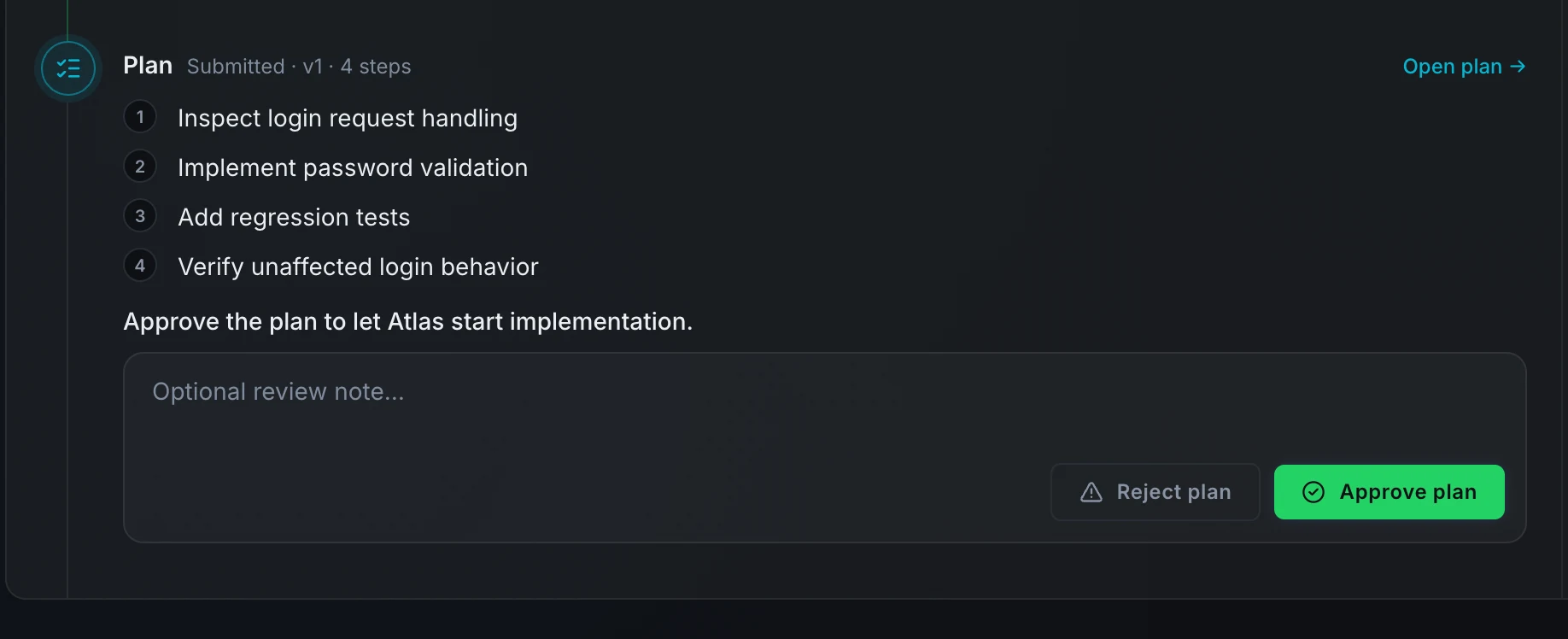
- Press Approve plan to accept the plan. The item moves to executing and the builder agent begins the work.
- Press Reject plan to send the item back to planning. The item returns to the
planningstate and the builder agent writes a revised plan.
A review note is optional when approving. When rejecting, a note helps the agent understand what to change in the next version.
Revise plan
The Plan tab's header shows a Revise plan button when a revision can be submitted from the work item's current state. Pressing it opens the plan form pre-filled with the current version's title, summary, and steps so you edit only what needs to change. Saving creates the next version; the previous version stays in history with its status.
While the item is awaiting fix review, the button shows the note "Request changes to revise the plan" because a revision requires the review decision first. Request changes without a review note to get the item back to planning; with a note, Atlas reruns the approved plan instead.
Auto-approval
When a project's trigger policy has approval turned off, plans skip the manual gate. Submitting a plan approves it immediately, the work item moves directly to executing, and no pending action appears on your board.
This setting is per project and is configured in project settings by a project admin.
Multi-repository projects
When your project is connected to more than one repository (for example saleor, saleor-dashboard, and storefront), every plan names the one repository its change is made in. When Atlas triages a ticket, it picks the repository that owns the behaviour, not every repository that calls it, and records it on the plan. If triage can't tell, the platform checks before the plan is submitted, in this order:
- A file path in the ticket, the spec, or a plan step that exists in exactly one of the repositories.
- A repository named in that text, when only one is.
- The single repository recorded in your project's knowledge base, when only one has been indexed.
The repository is stored on the plan and used during execution without any further action from you.
If it is still ambiguous, Submit plan is refused with a message under the button that lists the candidates. Add the repository name to the plan summary with Revise plan and submit again.
Next steps
- Work item states: what happens after a plan is approved and during execution.
- Work the board: where pending plan approvals appear as cards in In Progress.