
Jira integration
The Jira integration connects your Atlassian site to Flezise so that assigning a Jira issue to the platform agent or @mentioning it in a comment creates a work item and posts an acknowledgement back to the ticket.
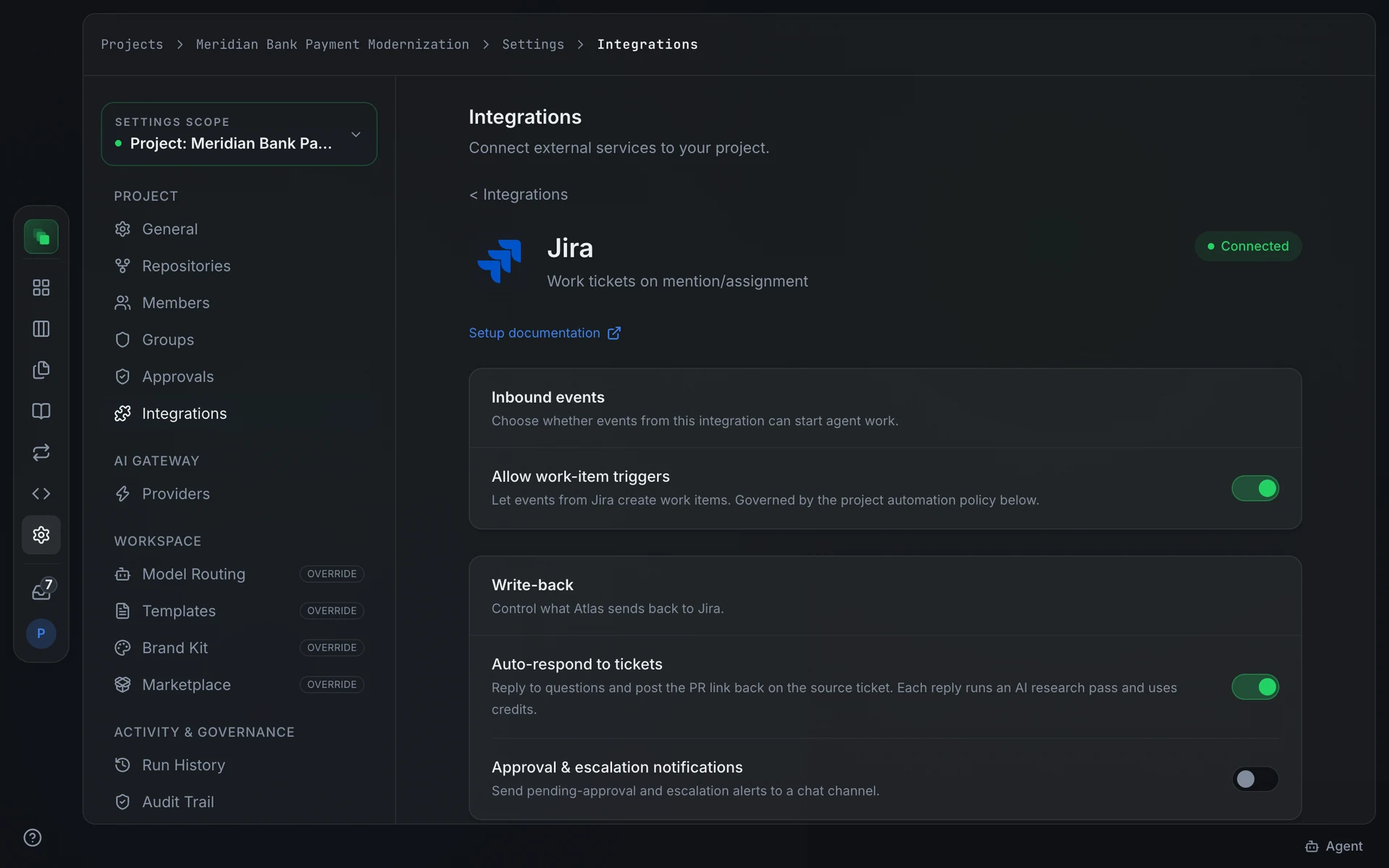
Connect
Open Project Settings → Integrations → Jira. Click Connect to authorize via OAuth, or Connect with token to enter API credentials directly.
OAuth requests these scopes: read:jira-work, write:jira-work, read:jira-user, read:me, and offline_access. The read:me scope captures the authorizing account identity so that Flezise can recognize when issues are assigned to that account. offline_access enables token refresh.
After OAuth, Flezise prompts you to Choose your Atlassian site if the authorizing account has access to more than one site. Select the site that holds the projects you want to connect.
Token connect accepts three credential fields:
Once connected, copy the Webhook URL from the connection detail page or the connection panel. Register it in Jira under Settings → System → WebHooks and subscribe to the issue and comment events listed below.
The Jira webhook URL contains the connection ID and acts as the authentication credential. Do not share it. To rotate it, delete the connection and reconnect.
Capabilities
Jira webhooks are not signed by Atlassian's 3LO OAuth apps. Flezise authenticates deliveries by resolving the per-connection ID embedded in the webhook URL. The URL itself is the credential.
Configuration
Jira has no additional config fields. After connecting, enable Inbound events on the detail page and optionally enable the Auto-respond to tickets write-back toggle so the platform agent posts an acknowledgement comment when it picks up a ticket. When Atlas delivers a fix, it comments again with a short Cause and Fix summary, the pull request link and the branch.
Events
Flezise classifies Jira events as follows:
The classifier detects an assignment event by checking whether the assignee fields in the changelog match the account identity captured at OAuth or token connect time. Comments are checked for an @mention of the agent and for language that signals a work request.
Flezise deduplicates deliveries using the x-atlassian-webhook-identifier header.
The project automation policy controls whether matched events create work items automatically. Check Project Settings → Integrations → Automation policy if assignments arrive but no work items appear.
FAQ
Assignments arrive but Flezise does not create a work item.
The classifier checks whether the assignee matches the account identity captured at connect time. If you connected with a token, the classifier has no account identity to compare and cannot confirm the assignment targets the platform agent. Use OAuth to capture the identity, or check that the Allow work-item triggers toggle is on and the automation policy permits the Jira provider.
I do not see a Signing Secret for Jira.
Jira does not sign webhook deliveries. The per-connection URL contains a 122-bit identifier that authenticates the delivery. Flezise does not display a signing secret for Jira connections.
Next steps
- Integrations overview: how events become work items
- Work the board: manage the work items that issue assignments create
- Runs: inspect the agent runs triggered by Jira events