
Marketplace
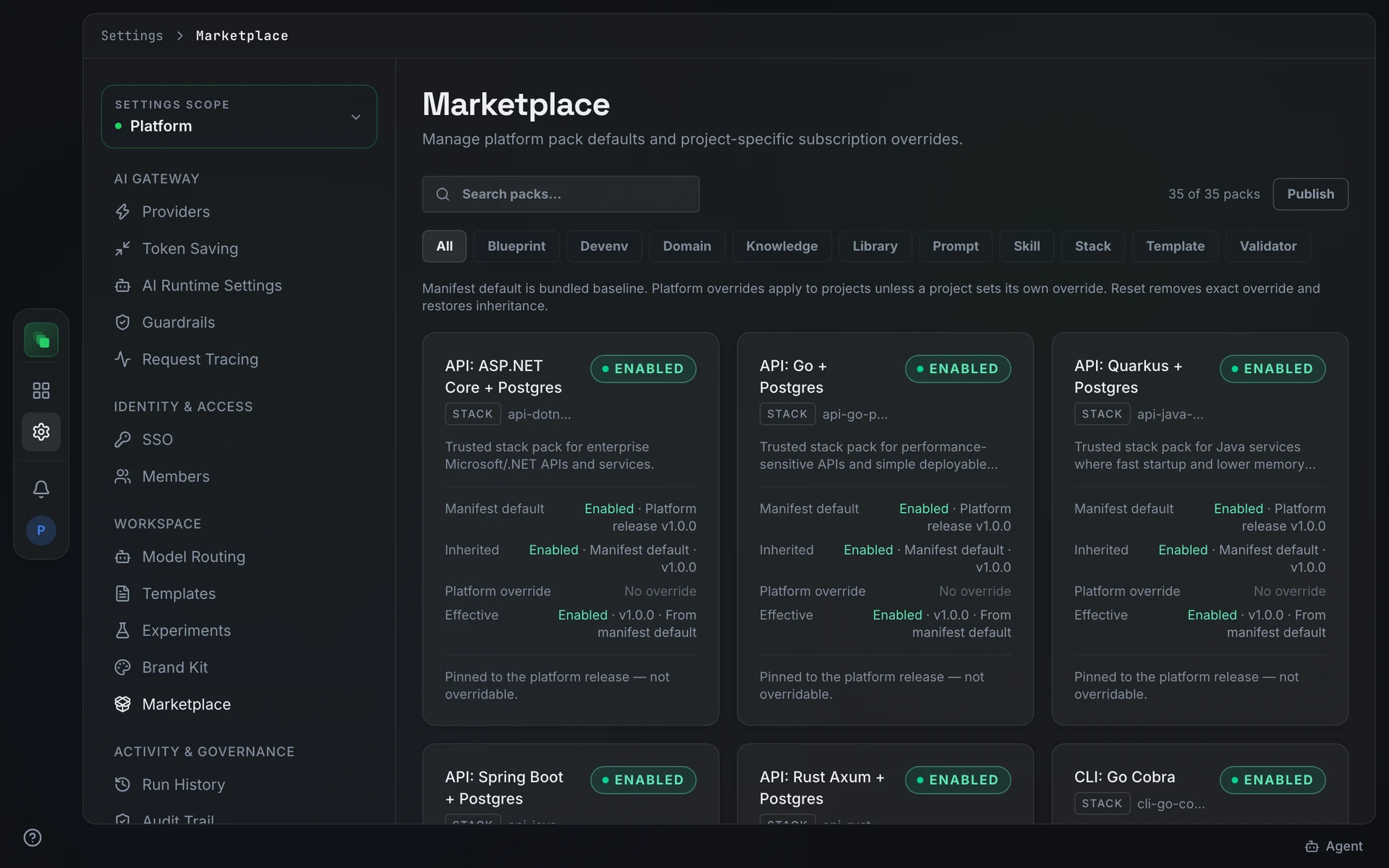
The Marketplace tab lists the content packs that generation draws on: skills, templates, blueprints, domain models, knowledge bases, and more. Platform settings flow down to every project; each project can set its own overrides.
Pack kinds
A pack declares one of twelve kinds in its manifest:
prompt, skill, template, domain, blueprint, validator, library, knowledge, brand, evidence, devenv, stack
The filter pills across the top of the tab show All plus one pill per kind present in your list. Select a pill to narrow the cards to that kind. Bundled packs display "Pinned to the platform release, not overridable." on their card.
Inheritance model
Platform and project scopes form a two-level hierarchy. The description at the top of the platform tab reads: "Manifest default is bundled baseline. Platform overrides apply to projects unless a project sets its own override." The project tab reads: "Inherited platform settings apply until this project sets an override. Reset removes exact override and restores inheritance."
Each pack card shows up to four rows: Manifest default, Inherited, Platform override or Project override, and Effective. The Customized badge appears when an override is active. A project override takes precedence over a platform override, which takes precedence over the manifest default.
Set, change, or reset an override
Press Enable override on a card to set this scope's own value. Press Disable override to deactivate the override at this scope without removing it. Press Reset to remove the override entirely and restore inheritance from the level above.
Version pinning
A pack card with an active version shows a version selector. Choose a specific version to pin the pack to that release. The Effective row on the card updates to reflect the pinned version.
Import a pack
Packs can be imported at the project scope. Press Import... on a pack card to open the Import dialog. The dialog states that imported artifacts arrive as drafts pending review, so each goes through the normal review flow before anything depends on it.
Publish a pack
Press Publish to open the Publish to marketplace dialog ("Package a tenant-private pack from a folder, a markdown body, or a tarball"). Fill in:
On success the dialog shows Published <name> (<kind>) v<version>.
Publish requires the marketplace.publish feature on your plan. Export knowledge pack requires marketplace.knowledge_export.
The Your published packs section lists every pack published from this project with its version, visibility, and size. Press Unpublish to retract one.
Skills in agent sessions
A project's agents use the platform's built-in skills plus every skill pack the project is subscribed to. Coding and generation sandboxes get them when they start. Project chat and automation runs look them up while they work, so a skill pack published and subscribed during a chat is available on the agent's next search, with no restart.
An agent can also propose a public skill from a GitHub link. The proposal appears under Your published packs marked Proposed by an agent, with the link and the agent's reason. No session can use it until someone approves it. Press Approve to publish it and subscribe the project that proposed it, or Reject to delete it.
Hot reload
Send POST /api/reload to re-read all marketplace content from disk without a rebuild. When PROMPT_RELOAD_SECRET is set in the environment, include a matching X-Reload-Secret header; requests without it are rejected.
Next steps
- Model routing: map AI models to each type of generation work.
- Settings overview: the platform-to-project settings inheritance model.