
Work the board
The board is the day-to-day view of all work items and artifact actions in a project. Work item cards move through five columns as their state changes. Artifact action cards for documents in generation or review appear here too.
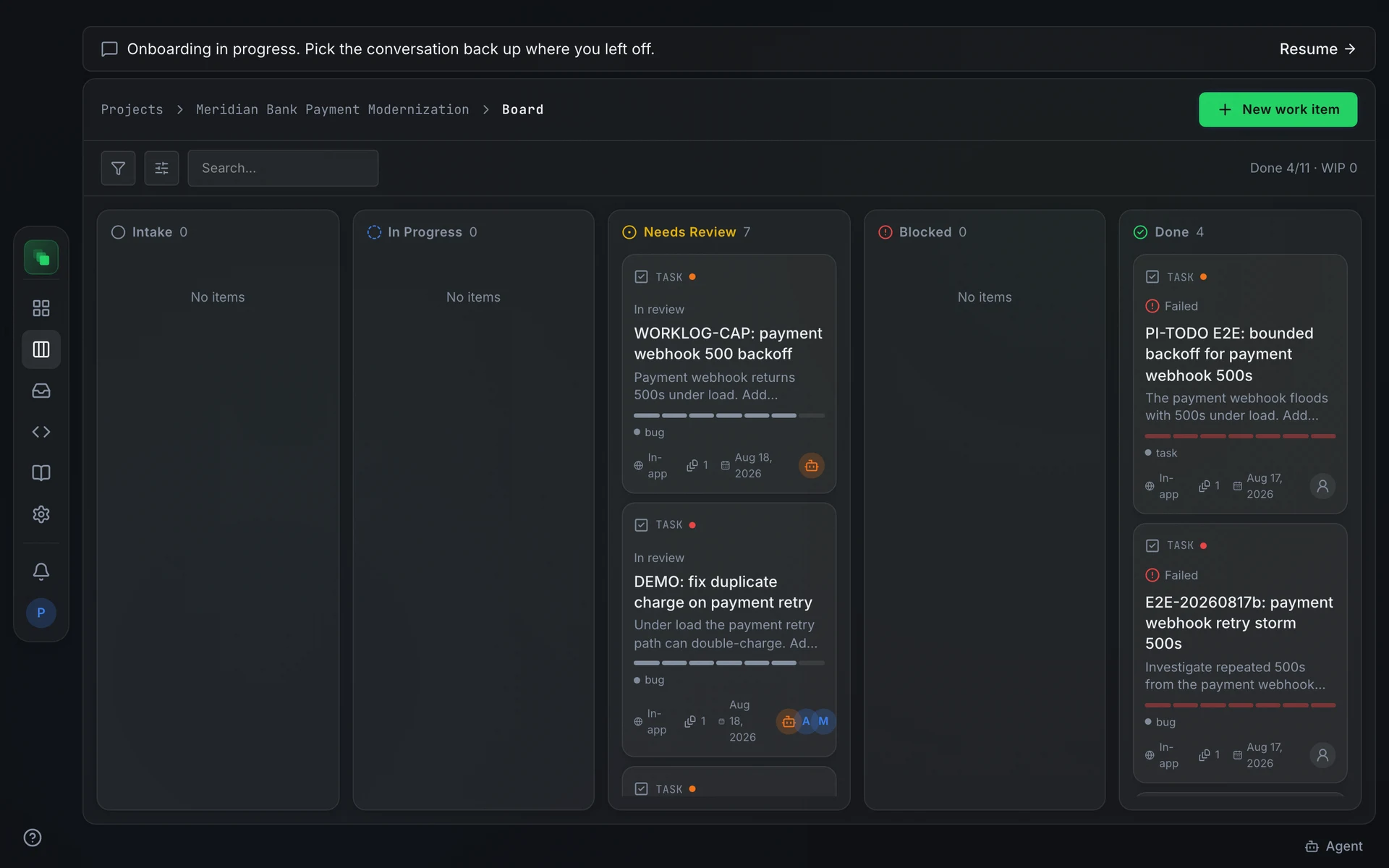
Columns
Needs Review has a WIP limit of five cards. The column header turns red when the limit is reached.
Artifact action cards can be dragged to trigger pipeline actions such as submit, approve, or request changes. Work item cards do not move by dragging; use the card's ⋮ menu to change state.
Table view
Press the layout toggle in the board header to switch from Kanban columns to a flat table. The table shows the same cards the current filters produce, in the same ordering. Switch back at any time; the filter and ordering state are preserved.
Filters and ordering
The board header has a search box and filter controls for type, status, assignee, priority, and label. Active filters stack: a card must match every active filter to appear. Each filter chip shows the count of matching cards.
Ordering and display preferences are stored per project and persist across sessions.
Card actions
Open a card's ⋮ menu for actions that depend on the item's state.
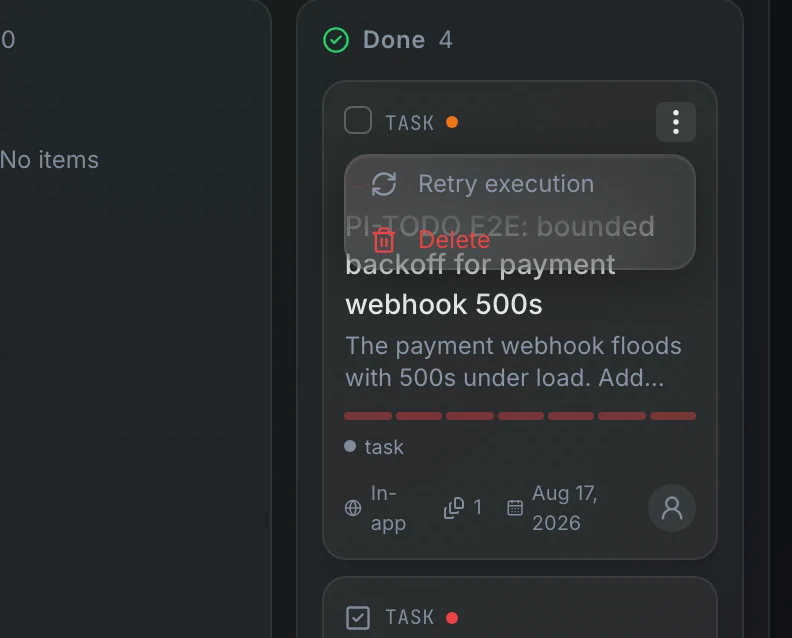
Move to lists the states the item can transition to from its current state. Retry execution appears only for items in the failed state. Archive takes a work item off the board but keeps everything about it: its history, plan, runs and branch. Use it to clean up finished or abandoned items you may want to look at again; it is refused while the agent is working on the item. Delete removes the item for good after a confirmation, for items created by mistake.
To see archived items, turn on Show archived in the board's Display menu. They appear dimmed with an Archived chip, and their menu offers Unarchive. A work item's page has the same Archive and Unarchive actions in its header menu.
See what a running item is doing
A running work item shows Watch live under its title. It opens the item on its Live tab: a chat with the agent doing the work, laid out like the project chat.
What you type there steers the agent mid-run: the message is delivered right after the agent finishes its current action, so it lands between steps rather than interrupting one. Files you attach go into the project's documents, and the message tells the agent where to find them.
While the agent works and the box is empty, the button in the box is Stop (Esc does the same). Stop aborts the current action and pauses the run; the box then says who stopped it. Your next message resumes the run in the same session. Pressing the button again instead ends the run and moves the item to Needs Review. If the agent's run dies (for example its worker restarted), the box says so and the button ends the run.
When the sandbox is not up yet, any message you send is queued and delivered automatically at session start.
The item page has an Overview besides Live. It follows the item from ticket to review. Its plan lists the steps; click a step to see its description and the agent's attempts at it. Verifications, after the outcome, lists each check the run went through with its own result: each test the agent ran, whether the change was committed, and the pull request. A check that did not apply says why (for example, a documentation change with no test to run). Activity in the … menu shows what happened and when, from triage and approvals to each stage the agent reports, with what it is doing now at the top.
Above the Overview, a line names the item's playbook and its steps in order, each marked done, in progress, failed, skipped or not started, with the risk level its rules set on the right. Tickets follow the Ticket playbook by default: Triage, Plan Approval, Change, Checks, Pull Request, Review, Merged. Spec builds follow Spec Build: Build, Checks, Pull Request, Review, Merged. Hover a step to see what it reported, for example how many fix turns the checks took, why no pull request was opened, or why a step was skipped; hover the risk to see what decided it. A pull request step reads skipped when the project has no Git connection. To change the steps for your project, see Playbooks.
Triage writes a Change Spec for the item, the unit the agent implements, as a feature's spec is in a new product. It is approved together with the plan: right away when the project needs no approval, so simple changes go straight to a pull request, or when you approve the plan otherwise. When the run commits, the spec records the branch and shows the diff: Review changes on the outcome opens it. What the run cost is shown as Agent Cost on the spec and on the item; click it for the call-by-call breakdown.
When the agent is done and the item needs review, it is assigned to the person who should check it, and they get an inbox notification. That is the item's owner if it already belongs to someone, otherwise the person who filed it, otherwise the first approver the project's approval settings name for a change spec (by default the project owner).
An item that builds an approved feature spec (titled Implement SPEC-…) has the same Overview. A Spec step takes the place of triage and the plan, because the spec was already written and approved; it links the spec and, once the build runs, its preview. Outcome shows what the build committed (branch, commit and pull request), or why it stopped, with Retry. If a build that was merged runs again and fails, the item leaves Completed and shows the failure, and a build that waits for the specs it depends on says so in the item's activity. Verifications lists the build's checks, whether the change was committed, and the pull request, as it does for a ticket. Your review asks you to accept the changes or request more. Request changes sends your note to the agent, which builds again on the same branch. Code Quality among the verifications covers two scans that never block the build: a quality score out of 100 (leftover comments and debug output, unsafe casts, swallowed errors, dead or duplicated code, overly complex functions, lint findings) and a check for stubbed code that only pretends to work (mock imports, in-memory stand-ins for the database, canned responses).
Accepting a spec build depends on where its code goes. In a project without a Git connection, Accept & merge merges the build's branch into the default branch and marks the spec merged, which starts any work that was waiting on it. If the merge conflicts, the spec goes back to its builder, which resolves the conflict and runs its checks again. With a Git connection the build opens a pull request: merge it in your repository, and accepting here only closes the item. Code Review among the verifications reports the agents' review of the change: no findings, findings posted as comments on the spec (serious ones mark it failed), or serious findings sent back to the builder to fix.
Bulk actions
Select one or more cards to bring up the bulk action bar at the bottom of the screen. Five actions are available, each applied only to the eligible cards in the selection:
- Assign sets the owner on selected work items.
- Approve sends an approval for selected artifact cards that are in a reviewable state. It has no effect on work items.
- Retry re-dispatches selected work items that are in the
failedstate. - Archive takes the selected work items off the board and keeps their history.
- Delete removes the selected items after confirmation.
To dismiss the bar, clear the selection.
When something goes wrong
A run failed. The card is in Done with a failed state. Open its ⋮ menu and choose Retry execution, or select multiple failed cards and use Retry in the bulk action bar. A retry re-dispatches the latest approved plan without requiring a new approval.
Triage is stuck. Triage is the step where the builder agent classifies a raw ticket before planning begins. Open the work item's detail page and press Retry triage on the triage card. Retrying execution does nothing for a triage failure.
From the terminal
state= accepts any value from the state reference at work item states.