
Triage and execution
When a work item is created, Atlas reads the ticket and classifies it. When you approve the plan, Atlas runs the implementation and attaches evidence. This page covers the triage card, the execution stages, and what to check when something goes wrong.
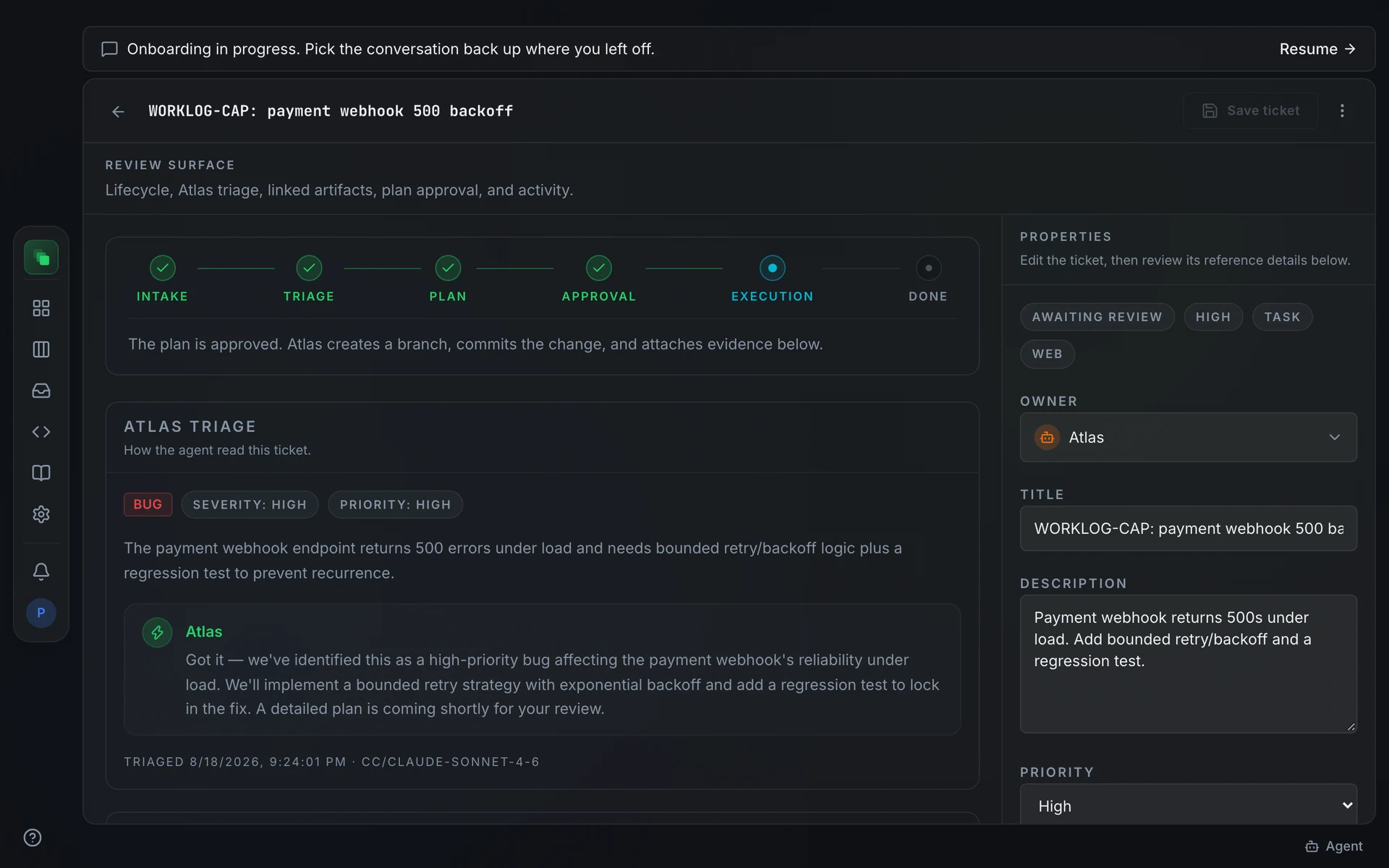
The Atlas triage card
Open any work item to find the Atlas triage node on the Overview tab.
When triage succeeds, the card shows:
- A classification badge: one of
bug,feature,question, ortask - Severity and priority derived from the ticket content
- A plain-language summary of what Atlas understood
- A response note from Atlas, styled as an agent comment
While triage is running, the card reads: "Atlas hasn't triaged this ticket yet. A classification and a suggested plan usually appear here within a few minutes."
When triage fails, a yellow warning appears with the error message and a Retry triage button. A note below confirms: "You can still write, review, and approve a plan manually below." Triage failure does not block plan creation or execution.
Agent execution
Approving the plan triggers execution. Atlas picks up the approved plan, moves the work item to the Execution stage, and begins working through the steps.
The executor guards against duplicate dispatches. If an investigation was already started within the last hour and is still running, re-approving does not start a second one.
Atlas creates a branch, works through each plan step, commits the change, and attaches branch name, commit hash, and changed files to the work item. When it finishes, the item moves to In review and the Your review node on the Overview tab becomes active.
Bug tickets go through an investigate-and-fix recipe: Atlas reproduces the problem with a failing test, confirms the fix, then opens a pull request with investigation evidence. Feature and task tickets go through an implement recipe: Atlas reads the code, applies the approved change, adds or updates the targeted tests, and opens a pull request with a change summary and verification results. No reproduction of old behaviour is needed for features or tasks.
Live progress
While a work item is executing, the board card shows a live progress bar labeled n/m tasks. The bar comes from Atlas's own task list: tasks completed over total tasks. The bar only appears while the item is in the Executing stage and Atlas has reported progress.
The six lifecycle stages drive the status markers on the Overview tab's timeline:
- Intake
- Triage
- Plan
- Approval
- Execution
- Done
Stages that have passed show a green marker. The current stage's marker is highlighted. An amber marker on a stage needs attention.
When execution fails
If execution fails, the work item moves to the Failed state. The Execution stage shows an error marker, and the hint on the detail page reads "Execution failed. Check the step results below, then start it again."
The failure is recorded as an agent_execution_failed event in the item's event timeline, with the error text stored in the work item payload.
To start again, open the card's ⋮ menu and choose Retry execution, or select failed cards on the board and press Retry in the bulk action bar. A retry re-dispatches the latest approved plan without re-planning. See Retries and assignment for the full options.
FAQ
Can I write a plan if triage failed?
Yes. Open the Plan tab and use the plan form to write a plan manually. Submit and approve it, and Atlas will execute it. The triage node continues to show the error and does not block the plan.
What is the difference between Retry triage and Retry execution?
Retry triage replays the Atlas triage step when classification failed. It appears on the triage card of the work item detail page. Retry execution re-dispatches the latest approved plan when the agent run failed. It appears in the card ⋮ menu on the board. The two failures are independent; retrying one does nothing for the other.