
Intake interview
The intake interview is how the builder agent learns what you are building. It asks questions in rounds, tracks what has been answered and what is still open, and uses your answers to draft the product brief. You can run it on your own or bring in teammates, each answering the questions their role owns. The interview runs inside the project at /onboarding.
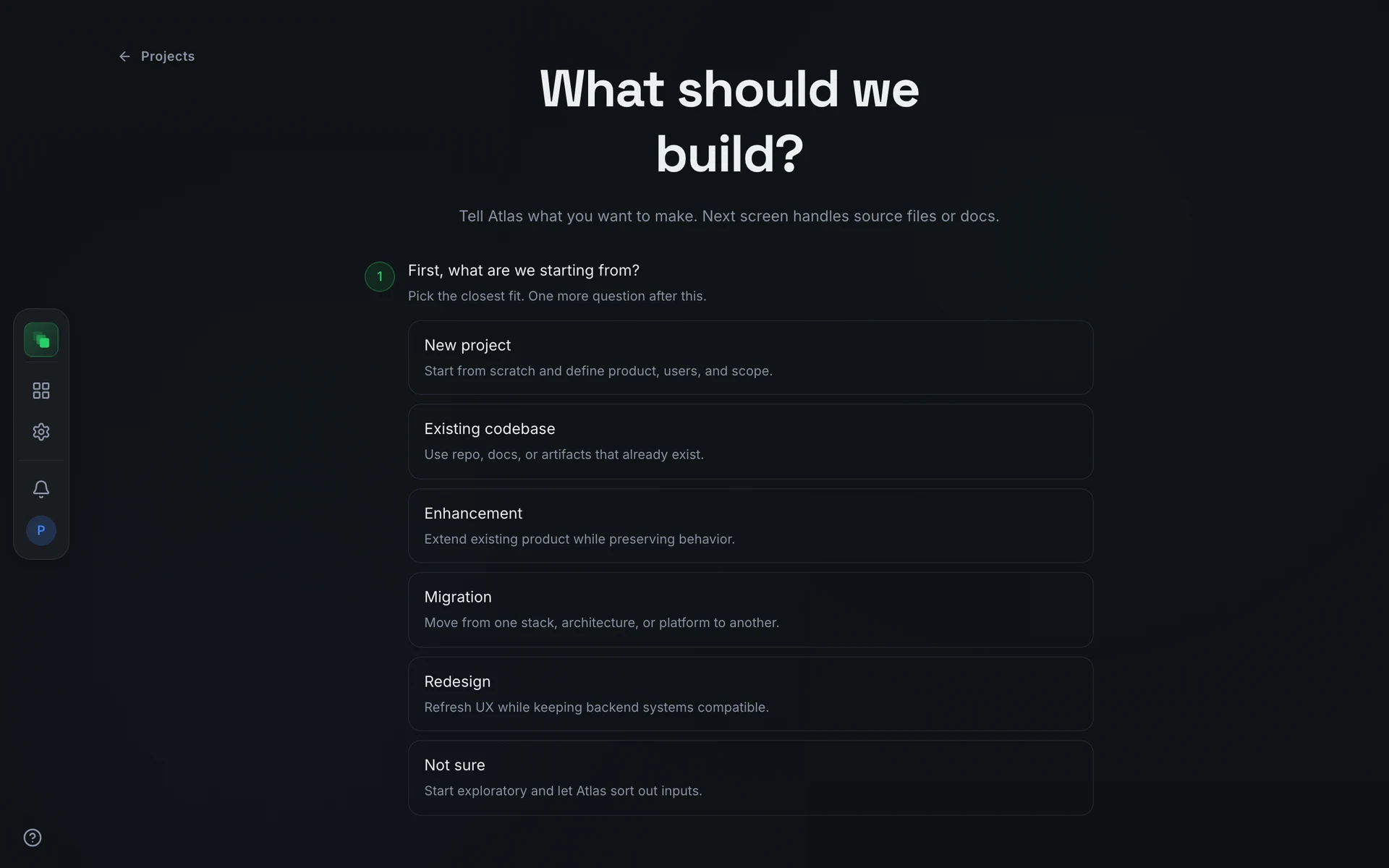
During the interview
The builder agent asks questions in rounds. Each round covers a category: goals, users, constraints, technical context, and so on. You answer in the chat, and the agent marks questions as resolved before moving to the next batch.
You can leave at any point and return later. While a session is live, every screen in the project shows a banner: Interview session is active. Press Rejoin live session to return to the active chat. When the session has ended but onboarding is not yet complete, the banner reads Onboarding in progress. Pick the conversation back up where you left off. and offers a Resume link.
Upload documents, diagrams, or reference files from the sidebar during the interview. The agent reads them and incorporates what it finds into the brief.
Answer as a team
Anyone in the interview can invite other people. Press Copy invite link in the header and share the link however you like; there is no email step. Opening the link starts a join screen titled Join the interview that asks for a Display name and, under Your roles, the stakeholder roles that person speaks for. No account is required. After Continue, they land in the same live interview you see.
Who answers what
The builder agent decides how each question is routed. A question tagged to one role goes only to the people who hold that role, and they answer on their own schedule. A question that everyone must answer personally keeps the round open until each participant has responded. A participant who has already answered sees Waiting on the other participants until the round closes, then Atlas is working through the answers.
When a participant is slow or a role has nobody in the room, the coordinator can fill the gap. The waiting banner above the composer lists each role the round is waiting on; View questions opens that role's questions in the question form, titled Answering for the role, and the coordinator answers on their behalf. Close returns to the coordinator's own questions.
The roster
The Participants panel, and the avatar strip in the toolbar, shows who is in the interview, the role each person represents, whether they are In the room or Away, and how many questions they have answered. The coordinator can manage everyone but themselves:
The coordinator cannot be excused or removed.
Notes to the room
Anyone can type a free-text note into the composer (Say something to the room…). Notes reach the builder agent even in the middle of a round. Open Notes in the toolbar to read them all under Participant notes, each tagged with its sender and marked Delivered, Pending, or Sent depending on whether the live session has picked it up yet.
Side sessions
A side session is a private space to work out one answer before you commit to it. It opens off a single question as its own chat with its own copy of the builder agent, forked from the interview so it already knows the discussion so far. Everything in it, including any documents you upload, stays yours: the pane reads Private to you. Nothing leaves until you send it.
Open one from the Side sessions group in the left rail. The New side session button (the +) starts a session on the question you have in focus; it is disabled, with No open question to start a side session from, when no question is selected. Each session is named after its question and carries a status of exploring, then ready, then brought in.
Inside, chat with the agent as you would in the interview (the composer suggests you Push back, or ask for another angle…) and attach reference files that only you can see. When you have the answer you want, press Bring to interview, edit the draft it offers, and press Send to interview. That records your answer against the original question and returns you to the interview. Only the person who opened a side session can send its answer across, and if the question has since closed or moved to another round, nothing is posted.
When stakeholders disagree
When two people give different answers to a single-answer question (project type, audience, scope, and the like), the interview flags a conflict. List-style answers, such as open questions, assumptions, and deferred decisions, are merged instead and never conflict.
How a conflict is settled depends on who owns it. If the question went to the whole room, the builder agent reconciles the difference in the conversation; the Synthesis panel marks that field Atlas reconciling and it does not block anything. If the agent cannot reconcile it, or the field was only ever meant to have one owner, the decision goes to the coordinator.
The coordinator settles it on a card titled Your stakeholders answered differently, above the chat composer. The card shows each competing answer and who gave it. The coordinator can pick one of them, type a different value into Or record a different value… and press Set, or press Ask Atlas's opinion. The agent's suggestion appears as Atlas would keep: … with its reasoning, but it is only advice: the coordinator still records the decision with Record it, so the choice is always a human one. Once settled, the field is marked Resolved.
Until every such conflict is settled, the product brief cannot be created. The creation gate lists each open one, for example Stakeholders gave conflicting answers for 'audience'.
The creation gate
When the interview has gathered enough coverage and Atlas has reached that point in the conversation, a creation gate card appears in the conversation pane, docked above the composer alongside any active question or conflict card. A coordinator is the only person who can act on it. While anything is still outstanding, such as a role that has not answered its questions or an unresolved conflict, the gate lists each blocker instead of the create action, and each entry links to the place where you clear it.
The gate card appears only after Atlas has formally asked for approval in the conversation, so the card and the agent's ask arrive at the same time.
Once the list is clear and Atlas has asked, the gate reads Atlas is ready to create the Product Brief with two buttons:
- Approve tells the builder agent to write and persist the product brief.
- Not yet declines at this moment. The gate stays open so you can approve when you are ready.
If you pressed Not yet and want to approve afterward, the gate shows a Product Brief creation declined notice with an Approve now button.
Once you press Approve, the card updates to confirm that the builder agent is creating the product brief. The brief is written from your interview answers.
After the brief is created
The product brief is created already Approved, with a system review recorded. You do not submit it for review yourself the way you do with later documents.
Three things unlock in sequence from that point:
The project home switches from the Getting started card to the Kanban board when onboarding is complete.
FAQ
Who counts as a coordinator?
A coordinator is any member of the project's coordinator group. The creation gate and the conflict card are not shown to other roles; only coordinators see the Approve and Not yet buttons and settle conflicts.
Do participants need an account?
No. Opening the invite link asks only for a display name and the roles the person represents, then drops them into the same live interview. Signing in is optional.
Can I restart the interview after the brief is created?
No. Once the product brief is created, onboarding is complete and the interview cannot be restarted. To start over, delete the project and create a new one.